- Welcome to LowPowerLab Forum.

Recent posts
#21
CurrentRanger / CurrentRangerApp
Last post by vitormhenrique - April 04, 2026, 03:16:17 AMHey everyone, I got inspired by the python CurrentRanger GUI but I needed some more functionality, mainly battery calculations.
I built a cross platform app that should work on Mac (requires bypassing apple quarantine), linux and windows, but only tested on Mac.
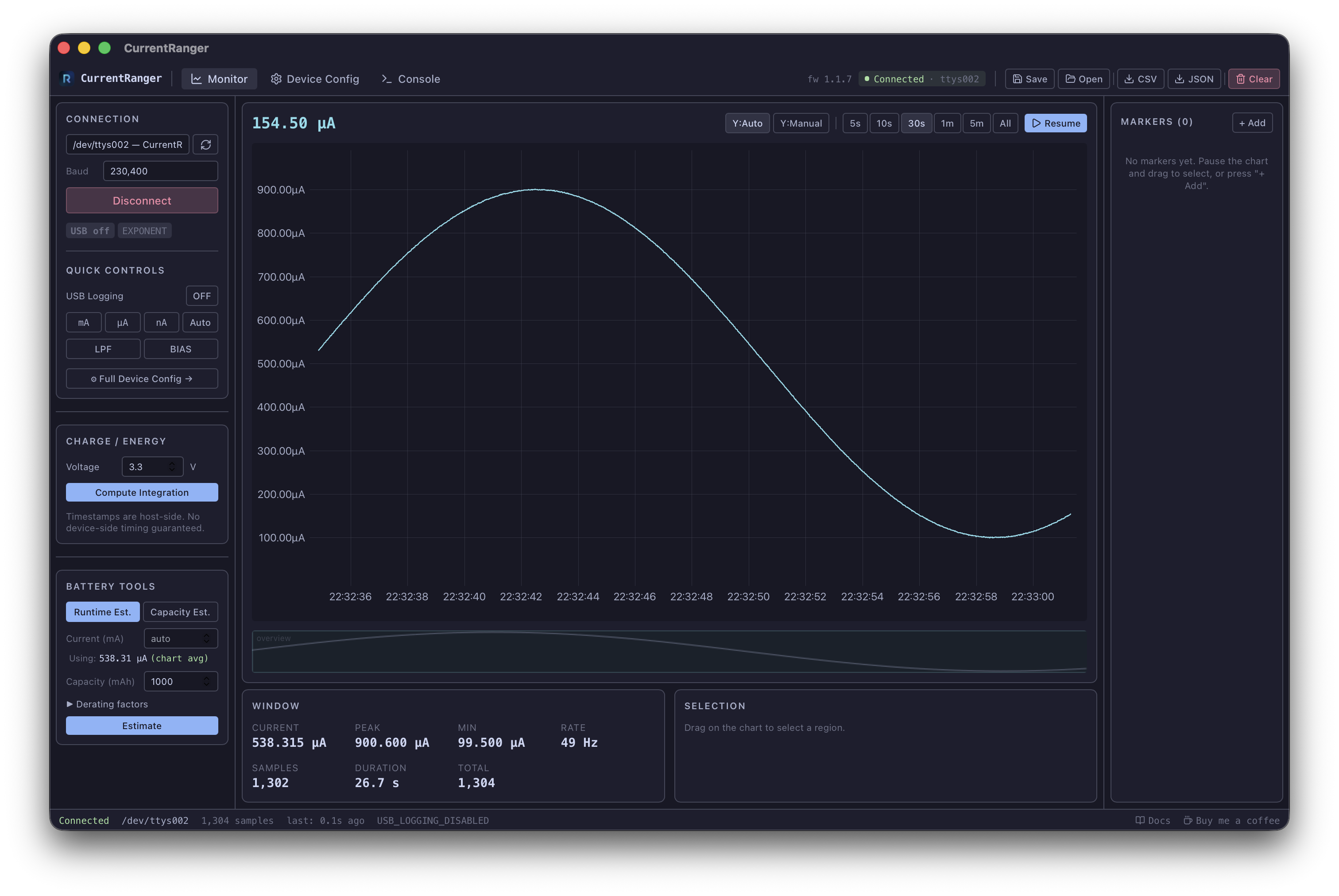
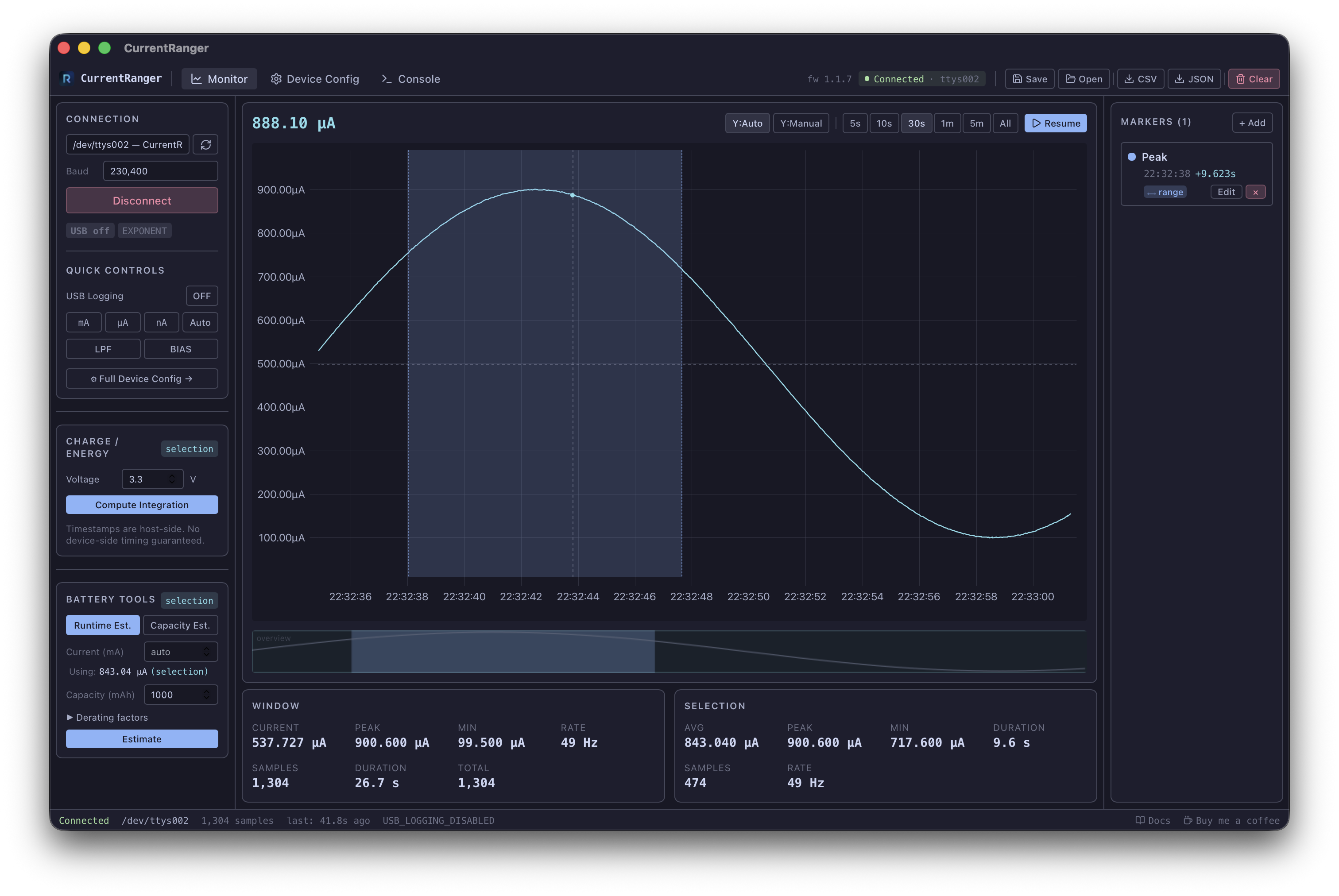
Full features list:
Serial Connection & Device Management
Auto-discovery — automatically enumerates and scores serial ports by VID/PID (0x239a), name patterns, and description
One-click connect at 230400 baud (also supports 115200, 57600, 9600)
USB logging bootstrap — automatically enables USB data streaming on connect
Cross-platform serial — macOS (cu.* rewrite, PTY support), Windows, Linux
Monotonic timestamps — Instant-based anchor ensures strictly ordered samples even through NTP adjustments
Batched sample delivery — 50ms or 100-sample batches for efficient frontend updates
Dedicated OS thread for serial I/O (blocking reads, never blocks the UI)
Real-Time Chart (uPlot)
500K+ sample rendering with hardware-accelerated uPlot
Live current readout auto-formatted (A / mA / µA / nA)
30 FPS animation loop (throttled, pauses when not visible)
Time window presets: 5s, 10s, 30s, 1m, 5m, All
Pause / Resume with automatic USB logging toggle
Mouse wheel zoom, click-drag pan, drag-to-select region
Auto or manual Y-axis scaling with min/max inputs
Min-max envelope downsampling preserving peaks and valleys
NaN gap breaks between acquisition sessions (line breaks cleanly)
Overview minimap with viewport rectangle, click-drag navigation, and marker rendering
Live & Selection Statistics
Window stats: average, peak, min current; sample rate (Hz); sample count; duration
Selection stats: drag any region for avg, peak, min, duration, samples, rate
Charge & Energy Integration
Trapezoidal-rule integration over all samples or a selected region
Configurable supply voltage (default 3.3V)
Results: Coulombs, mAh, Ah; Joules, mWh, Wh; duration; average current; sample count
Battery Tools
Runtime estimator: input battery capacity + average current → estimated runtime
Required capacity estimator: input desired runtime + average current → required battery mAh
Auto-detects average current from chart or selection
Derating factors: regulator efficiency, depth of discharge, aging margin
Markers & Annotations
Point markers (single timestamp, vertical line) and range markers (shaded region)
7 categories: Note, Boot, Idle, Sleep, Radio TX, Sensor Sample, Custom — each with distinct colors
Create via: right-click chart, press M key, or panel button
Right-click a selection to create a range marker spanning it
Edit inline in the markers panel (label, note, color, category)
Click a marker to navigate the chart to that timestamp
Click a range marker on the chart to select its region and compute stats
Rendered on both the main chart and the minimap
Device Configuration (Full Panel)
Range selection: mA, µA, nA (manual) or autoranging
Low-Pass Filter (LPF) toggle
BIAS / bidirectional mode toggle
Logging format cycle: EXPONENT, NANOS, MICROS, MILLIS, ADC
ADC sampling speed: AVG, FAST, SLOW
Auto-off mode: DEFAULT (10 min), DISABLED, SMART
GPIO range indication toggle (SCK/MISO/MOSI header pins)
USB / Bluetooth logging toggles
EEPROM calibration: ADC Gain, ADC Offset, LDO voltage — increment/decrement with live display
Reset all settings to factory defaults (with confirmation)
Print serial menu (query firmware version and calibration values)
Workspace Save / Load
.crws JSON format (versioned schema v1)
Persists: all samples, markers, settings, device status, chart state
Atomic writes (.tmp → rename) to prevent corruption
Future version detection — rejects workspaces from newer schema versions
Data Export
CSV: time_unix_s, elapsed_s, current_a, current_ma, current_ua, current_na with metadata header
JSON: versioned export with timestamp, voltage, all samples, all markers
Clear samples with confirmation dialog
Console (Built-in Log Viewer)
Structured logs with 2000-entry ring buffer
Level filtering: DEBUG, INFO, WARN, ERROR (color-coded, toggleable)
Source filtering with autocomplete
Auto-scroll (disengages on manual scroll-up)
Copy all visible logs to clipboard
Captures: API calls, serial events, connection status, device status, chart events, workspace operations
Status Bar
Connection state (color-coded: green/yellow/red)
Connected port name, total sample count, "last sample N seconds ago"
Error and status message display
Docs link and donation link
Keyboard Shortcuts
M — add point marker at cursor (or range marker if selection active)
Enter — confirm marker popup
Escape — cancel marker popup/editing
Mock Device (for Development & Testing)
Full CurrentRanger R3 firmware simulator with PTY-based serial emulation
12 waveform types: Steady DC, Sine, Pulse, Sawtooth, Brownian Noise, Sleep/Wake, Random, Step Up/Down/Ping-Pong, Exponential Decay, Burst
Interactive TUI (ratatui) with waveform selector, parameter controls, sparkline display
Responds to all single-char firmware commands
Cross-Platform
macOS (Apple Silicon + Intel) — .dmg
Windows — .exe installer + .msi
Linux — .deb + .AppImage
Built with GitHub Actions CI/CD
Tech Stack
Rust + Tauri v2 backend
React 18 + TypeScript frontend
Zustand state management
uPlot charting
Tailwind CSS (Catppuccin Mocha dark theme)
Vite bundler
Documentation:
https://vitormhenrique.github.io/CurrentRangerApp
Source code:
https://github.com/vitormhenrique/CurrentRangerApp
I need some help testing the app!
I built a cross platform app that should work on Mac (requires bypassing apple quarantine), linux and windows, but only tested on Mac.
Full features list:
Serial Connection & Device Management
Auto-discovery — automatically enumerates and scores serial ports by VID/PID (0x239a), name patterns, and description
One-click connect at 230400 baud (also supports 115200, 57600, 9600)
USB logging bootstrap — automatically enables USB data streaming on connect
Cross-platform serial — macOS (cu.* rewrite, PTY support), Windows, Linux
Monotonic timestamps — Instant-based anchor ensures strictly ordered samples even through NTP adjustments
Batched sample delivery — 50ms or 100-sample batches for efficient frontend updates
Dedicated OS thread for serial I/O (blocking reads, never blocks the UI)
Real-Time Chart (uPlot)
500K+ sample rendering with hardware-accelerated uPlot
Live current readout auto-formatted (A / mA / µA / nA)
30 FPS animation loop (throttled, pauses when not visible)
Time window presets: 5s, 10s, 30s, 1m, 5m, All
Pause / Resume with automatic USB logging toggle
Mouse wheel zoom, click-drag pan, drag-to-select region
Auto or manual Y-axis scaling with min/max inputs
Min-max envelope downsampling preserving peaks and valleys
NaN gap breaks between acquisition sessions (line breaks cleanly)
Overview minimap with viewport rectangle, click-drag navigation, and marker rendering
Live & Selection Statistics
Window stats: average, peak, min current; sample rate (Hz); sample count; duration
Selection stats: drag any region for avg, peak, min, duration, samples, rate
Charge & Energy Integration
Trapezoidal-rule integration over all samples or a selected region
Configurable supply voltage (default 3.3V)
Results: Coulombs, mAh, Ah; Joules, mWh, Wh; duration; average current; sample count
Battery Tools
Runtime estimator: input battery capacity + average current → estimated runtime
Required capacity estimator: input desired runtime + average current → required battery mAh
Auto-detects average current from chart or selection
Derating factors: regulator efficiency, depth of discharge, aging margin
Markers & Annotations
Point markers (single timestamp, vertical line) and range markers (shaded region)
7 categories: Note, Boot, Idle, Sleep, Radio TX, Sensor Sample, Custom — each with distinct colors
Create via: right-click chart, press M key, or panel button
Right-click a selection to create a range marker spanning it
Edit inline in the markers panel (label, note, color, category)
Click a marker to navigate the chart to that timestamp
Click a range marker on the chart to select its region and compute stats
Rendered on both the main chart and the minimap
Device Configuration (Full Panel)
Range selection: mA, µA, nA (manual) or autoranging
Low-Pass Filter (LPF) toggle
BIAS / bidirectional mode toggle
Logging format cycle: EXPONENT, NANOS, MICROS, MILLIS, ADC
ADC sampling speed: AVG, FAST, SLOW
Auto-off mode: DEFAULT (10 min), DISABLED, SMART
GPIO range indication toggle (SCK/MISO/MOSI header pins)
USB / Bluetooth logging toggles
EEPROM calibration: ADC Gain, ADC Offset, LDO voltage — increment/decrement with live display
Reset all settings to factory defaults (with confirmation)
Print serial menu (query firmware version and calibration values)
Workspace Save / Load
.crws JSON format (versioned schema v1)
Persists: all samples, markers, settings, device status, chart state
Atomic writes (.tmp → rename) to prevent corruption
Future version detection — rejects workspaces from newer schema versions
Data Export
CSV: time_unix_s, elapsed_s, current_a, current_ma, current_ua, current_na with metadata header
JSON: versioned export with timestamp, voltage, all samples, all markers
Clear samples with confirmation dialog
Console (Built-in Log Viewer)
Structured logs with 2000-entry ring buffer
Level filtering: DEBUG, INFO, WARN, ERROR (color-coded, toggleable)
Source filtering with autocomplete
Auto-scroll (disengages on manual scroll-up)
Copy all visible logs to clipboard
Captures: API calls, serial events, connection status, device status, chart events, workspace operations
Status Bar
Connection state (color-coded: green/yellow/red)
Connected port name, total sample count, "last sample N seconds ago"
Error and status message display
Docs link and donation link
Keyboard Shortcuts
M — add point marker at cursor (or range marker if selection active)
Enter — confirm marker popup
Escape — cancel marker popup/editing
Mock Device (for Development & Testing)
Full CurrentRanger R3 firmware simulator with PTY-based serial emulation
12 waveform types: Steady DC, Sine, Pulse, Sawtooth, Brownian Noise, Sleep/Wake, Random, Step Up/Down/Ping-Pong, Exponential Decay, Burst
Interactive TUI (ratatui) with waveform selector, parameter controls, sparkline display
Responds to all single-char firmware commands
Cross-Platform
macOS (Apple Silicon + Intel) — .dmg
Windows — .exe installer + .msi
Linux — .deb + .AppImage
Built with GitHub Actions CI/CD
Tech Stack
Rust + Tauri v2 backend
React 18 + TypeScript frontend
Zustand state management
uPlot charting
Tailwind CSS (Catppuccin Mocha dark theme)
Vite bundler
Documentation:
https://vitormhenrique.github.io/CurrentRangerApp
Source code:
https://github.com/vitormhenrique/CurrentRangerApp
I need some help testing the app!
#22
Low Power Techniques / Wireless low power battery pow...
Last post by Samurai - February 19, 2026, 11:46:11 AMHi there,
I am looking to create some wireless battery powered low power devices that I can place around my property and hook up some sensors, and have the readings transmitted back to my home assistant receiver device.
For example:
- I want to place some temperature sensors around the property and have a reading every 15 minutes.
Criteria:
- range at least 50m through the garden and into the house (brick).
- preferably powered by a 3,6v battery for at least 1 year.
- wireless technology can be anything, since I have not yet made the receiving node.
Is it too optimistic to think that such a device can be made for max 5 euro including sensor but excluding battery)?
This guy made a nice solution using zigbee, but the board alone exceeds the budget by far - but just to show the concept: https://tutoduino.fr/en/tutorials/esp32c6-zigbee/
Any suggestions for parts and technologies?
I am looking to create some wireless battery powered low power devices that I can place around my property and hook up some sensors, and have the readings transmitted back to my home assistant receiver device.
For example:
- I want to place some temperature sensors around the property and have a reading every 15 minutes.
Criteria:
- range at least 50m through the garden and into the house (brick).
- preferably powered by a 3,6v battery for at least 1 year.
- wireless technology can be anything, since I have not yet made the receiving node.
Is it too optimistic to think that such a device can be made for max 5 euro including sensor but excluding battery)?
This guy made a nice solution using zigbee, but the board alone exceeds the budget by far - but just to show the concept: https://tutoduino.fr/en/tutorials/esp32c6-zigbee/
Any suggestions for parts and technologies?
#23
Pi Gateway / Re: Fresh Install of Pi Gatewa...
Last post by brasskey4u - February 13, 2026, 08:34:28 AMYes, I think just copying the SD card will be the best bet for now. I'm inspired now to try something else with the other Motenio's I have and get a few more nodes fired up. Do you have any plans to make some of the back ordered projects again? I'm guessing you have other irons in the fire now. So many IoT devices to play with now than years ago. I have Home Assistant, but have yet to really dive into it. Seems somewhat clumsy and not very intuitive for my old brain.
#24
Pi Gateway / Re: Fresh Install of Pi Gatewa...
Last post by Felix - February 13, 2026, 08:16:06 AMThat's somewhere in my mile long TODO list for the PiGateway project. A script or some way to back/zip up everything in a single archive that's compact and easy to unpack and replace everything later. But it's probably more involved than it sounds because of dependencies in node.js.
For now the way I do it is just pop out the SD and image it. I use industrial grade SD's though so I have not seen a single SD corruption fail in forever. There is minimal wear because the logs are cyclical and the database is incremental. The OS is probably where most "wear" is. But you can always use an SSD now with Pi+NVME/M.2 hats.
For now the way I do it is just pop out the SD and image it. I use industrial grade SD's though so I have not seen a single SD corruption fail in forever. There is minimal wear because the logs are cyclical and the database is incremental. The OS is probably where most "wear" is. But you can always use an SSD now with Pi+NVME/M.2 hats.
#25
Pi Gateway / Re: Fresh Install of Pi Gatewa...
Last post by brasskey4u - February 12, 2026, 11:32:35 AMOK, that was it! No more restarts. So hopefully my last question. What is the EASY way to back up this entire SD card or make a copy of it? I would like to have a full back up of this so I don't have all this "fun" next time. If you know of any utilities I would be most thankful. Appreciate the time you took with me on this. Hopefully our conversations will help someone else. By the way, I did not change anything on the MightyHat or the 2 weather nodes or sonar mote, just wanted to throw that out there. Only the battery in the Mote was replaced. Man is this nice to have this all back. Have a great day. Thanks again.
#26
Pi Gateway / Re: Fresh Install of Pi Gatewa...
Last post by Felix - February 12, 2026, 11:07:40 AM #27
Pi Gateway / Re: Fresh Install of Pi Gatewa...
Last post by brasskey4u - February 11, 2026, 10:47:08 AMI see this over and over in the log:
pi@pigate:~/gateway/logs $ tail -100 gateway.sys.log
at /home/pi/gateway/node_modules/nedb/lib/persistence.js:201:12
at FSReqCallback.oncomplete (node:fs:180:23)
Node.js v25.6.1
[26/02/11 10:45:12.308] [INFO] *********************************************************************
[26/02/11 10:45:12.314] [INFO] ************************* GATEWAY APP START *************************
[26/02/11 10:45:12.315] [INFO] *********************************************************************
[26/02/11 10:45:12.358] [INFO] LOADING METRICS MODULE [./metrics/core.js]
[26/02/11 10:45:12.362] [INFO] |- GLOBALIZING ONEDAY
[26/02/11 10:45:12.364] [INFO] |- GLOBALIZING isNumeric()
[26/02/11 10:45:12.365] [INFO] |- GLOBALIZING isValidIP()
[26/02/11 10:45:12.366] [INFO] |- GLOBALIZING isValidNodeId()
[26/02/11 10:45:12.367] [INFO] |- GLOBALIZING determineValue()
[26/02/11 10:45:12.368] [INFO] |- GLOBALIZING determineGraphValue()
[26/02/11 10:45:12.370] [INFO] |- GLOBALIZING timeoutOffset()
[26/02/11 10:45:12.371] [INFO] |- GLOBALIZING millisToFutureDate()
[26/02/11 10:45:12.372] [INFO] |- GLOBALIZING nextSunriseOrSunset()
[26/02/11 10:45:12.452] [INFO] LOADING METRICS MODULE [/home/pi/gateway/metrics/_LowPowerLab/doorbellmote.js]
[26/02/11 10:45:12.456] [INFO] LOADING METRICS MODULE [/home/pi/gateway/metrics/_LowPowerLab/garagemote.js]
[26/02/11 10:45:12.470] [INFO] LOADING METRICS MODULE [/home/pi/gateway/metrics/_LowPowerLab/motionmote.js]
[26/02/11 10:45:12.474] [INFO] LOADING METRICS MODULE [/home/pi/gateway/metrics/_LowPowerLab/RadioThermostat_CT50.js]
[26/02/11 10:45:12.480] [INFO] LOADING METRICS MODULE [/home/pi/gateway/metrics/_LowPowerLab/sonarmote.js]
[26/02/11 10:45:12.483] [INFO] LOADING METRICS MODULE [/home/pi/gateway/metrics/_LowPowerLab/sprinklers.js]
[26/02/11 10:45:12.488] [INFO] LOADING METRICS MODULE [/home/pi/gateway/metrics/_LowPowerLab/switchmote.js]
[26/02/11 10:45:12.492] [INFO] LOADING METRICS MODULE [/home/pi/gateway/metrics/_LowPowerLab/watermeter.js]
[26/02/11 10:45:12.495] [INFO] LOADING METRICS MODULE [/home/pi/gateway/metrics/_LowPowerLab/weathershield.js]
[26/02/11 10:45:12.499] [INFO] LOADING METRICS MODULE [/home/pi/gateway/metrics/examples/_example.js]
[26/02/11 10:45:12.504] [INFO] |- GLOBALIZING ONEDAYHOURS
[26/02/11 10:45:12.505] [INFO] |- GLOBALIZING secondsInOneDay()
[26/02/11 10:45:12.506] [INFO] LOADING METRICS MODULE [/home/pi/gateway/metrics/examples/_garage-auto-close.js]
[26/02/11 10:45:12.509] [INFO] LOADING METRICS MODULE [/home/pi/gateway/metrics/examples/_InternetSpeedTest.js]
[26/02/11 10:45:12.558] [INFO] SERIAL PORT CONNECTION TO: /dev/serial0 @ 19200baud
[26/02/11 10:45:12.695] [INFO] Available serial port: {path:'/dev/ttyS0'}
[26/02/11 10:45:12.709] [LOG] /dev/serial0>:GTWCMD:UPTIME
[26/02/11 10:45:12.713] [LOG] /dev/serial0>:GTWCMD:FREERAM
[26/02/11 10:45:12.715] [LOG] /dev/serial0>:GTWCMD:SYSFREQ
[26/02/11 10:45:12.716] [LOG] /dev/serial0>:GTWCMD:UPTIME
[26/02/11 10:45:12.717] [LOG] /dev/serial0>:GTWCMD:FREERAM
[26/02/11 10:45:12.719] [LOG] /dev/serial0>:GTWCMD:SYSFREQ
[26/02/11 10:45:12.720] [LOG] /dev/serial0>:GTWCMD:GATEWAYFWVERSION
[26/02/11 10:45:12.721] [LOG] /dev/serial0>:GTWCMD:GATEWAYFWNAME
[26/02/11 10:45:12.723] [LOG] /dev/serial0>:GTWCMD:FLXIMG
[26/02/11 10:45:12.725] [LOG] /dev/serial0>:GTWCMD:NETID
[26/02/11 10:45:15.440] [LOG] /dev/serial0>:[22] .93 [RSSI:-68][ACK-sent]
[26/02/11 10:45:15.463] [LOG] NODEDATA PARTIAL NOMATCH>: .93
[26/02/11 10:45:15.468] [LOG] post: /home/pi/gateway/data/db/0022_RSSI.bin[1770824715,-68]
[26/02/11 10:45:15.472] [LOG] NODEDATA PARTIAL NOMATCH>: [RSSI:-68][ACK-sent]
/home/pi/gateway/gateway.js:981
console.dbupdate(`[${id}] updated`);
^
TypeError: console.dbupdate is not a function
at /home/pi/gateway/gateway.js:981:19
at newArguments.<computed> (/home/pi/gateway/node_modules/nedb/lib/executor.js:29:17)
at /home/pi/gateway/node_modules/nedb/lib/datastore.js:643:18
at /home/pi/gateway/node_modules/nedb/lib/persistence.js:201:12
at FSReqCallback.oncomplete (node:fs:180:23)
pi@pigate:~/gateway/logs $ tail -100 gateway.sys.log
at /home/pi/gateway/node_modules/nedb/lib/persistence.js:201:12
at FSReqCallback.oncomplete (node:fs:180:23)
Node.js v25.6.1
[26/02/11 10:45:12.308] [INFO] *********************************************************************
[26/02/11 10:45:12.314] [INFO] ************************* GATEWAY APP START *************************
[26/02/11 10:45:12.315] [INFO] *********************************************************************
[26/02/11 10:45:12.358] [INFO] LOADING METRICS MODULE [./metrics/core.js]
[26/02/11 10:45:12.362] [INFO] |- GLOBALIZING ONEDAY
[26/02/11 10:45:12.364] [INFO] |- GLOBALIZING isNumeric()
[26/02/11 10:45:12.365] [INFO] |- GLOBALIZING isValidIP()
[26/02/11 10:45:12.366] [INFO] |- GLOBALIZING isValidNodeId()
[26/02/11 10:45:12.367] [INFO] |- GLOBALIZING determineValue()
[26/02/11 10:45:12.368] [INFO] |- GLOBALIZING determineGraphValue()
[26/02/11 10:45:12.370] [INFO] |- GLOBALIZING timeoutOffset()
[26/02/11 10:45:12.371] [INFO] |- GLOBALIZING millisToFutureDate()
[26/02/11 10:45:12.372] [INFO] |- GLOBALIZING nextSunriseOrSunset()
[26/02/11 10:45:12.452] [INFO] LOADING METRICS MODULE [/home/pi/gateway/metrics/_LowPowerLab/doorbellmote.js]
[26/02/11 10:45:12.456] [INFO] LOADING METRICS MODULE [/home/pi/gateway/metrics/_LowPowerLab/garagemote.js]
[26/02/11 10:45:12.470] [INFO] LOADING METRICS MODULE [/home/pi/gateway/metrics/_LowPowerLab/motionmote.js]
[26/02/11 10:45:12.474] [INFO] LOADING METRICS MODULE [/home/pi/gateway/metrics/_LowPowerLab/RadioThermostat_CT50.js]
[26/02/11 10:45:12.480] [INFO] LOADING METRICS MODULE [/home/pi/gateway/metrics/_LowPowerLab/sonarmote.js]
[26/02/11 10:45:12.483] [INFO] LOADING METRICS MODULE [/home/pi/gateway/metrics/_LowPowerLab/sprinklers.js]
[26/02/11 10:45:12.488] [INFO] LOADING METRICS MODULE [/home/pi/gateway/metrics/_LowPowerLab/switchmote.js]
[26/02/11 10:45:12.492] [INFO] LOADING METRICS MODULE [/home/pi/gateway/metrics/_LowPowerLab/watermeter.js]
[26/02/11 10:45:12.495] [INFO] LOADING METRICS MODULE [/home/pi/gateway/metrics/_LowPowerLab/weathershield.js]
[26/02/11 10:45:12.499] [INFO] LOADING METRICS MODULE [/home/pi/gateway/metrics/examples/_example.js]
[26/02/11 10:45:12.504] [INFO] |- GLOBALIZING ONEDAYHOURS
[26/02/11 10:45:12.505] [INFO] |- GLOBALIZING secondsInOneDay()
[26/02/11 10:45:12.506] [INFO] LOADING METRICS MODULE [/home/pi/gateway/metrics/examples/_garage-auto-close.js]
[26/02/11 10:45:12.509] [INFO] LOADING METRICS MODULE [/home/pi/gateway/metrics/examples/_InternetSpeedTest.js]
[26/02/11 10:45:12.558] [INFO] SERIAL PORT CONNECTION TO: /dev/serial0 @ 19200baud
[26/02/11 10:45:12.695] [INFO] Available serial port: {path:'/dev/ttyS0'}
[26/02/11 10:45:12.709] [LOG] /dev/serial0>:GTWCMD:UPTIME
[26/02/11 10:45:12.713] [LOG] /dev/serial0>:GTWCMD:FREERAM
[26/02/11 10:45:12.715] [LOG] /dev/serial0>:GTWCMD:SYSFREQ
[26/02/11 10:45:12.716] [LOG] /dev/serial0>:GTWCMD:UPTIME
[26/02/11 10:45:12.717] [LOG] /dev/serial0>:GTWCMD:FREERAM
[26/02/11 10:45:12.719] [LOG] /dev/serial0>:GTWCMD:SYSFREQ
[26/02/11 10:45:12.720] [LOG] /dev/serial0>:GTWCMD:GATEWAYFWVERSION
[26/02/11 10:45:12.721] [LOG] /dev/serial0>:GTWCMD:GATEWAYFWNAME
[26/02/11 10:45:12.723] [LOG] /dev/serial0>:GTWCMD:FLXIMG
[26/02/11 10:45:12.725] [LOG] /dev/serial0>:GTWCMD:NETID
[26/02/11 10:45:15.440] [LOG] /dev/serial0>:[22] .93 [RSSI:-68][ACK-sent]
[26/02/11 10:45:15.463] [LOG] NODEDATA PARTIAL NOMATCH>: .93
[26/02/11 10:45:15.468] [LOG] post: /home/pi/gateway/data/db/0022_RSSI.bin[1770824715,-68]
[26/02/11 10:45:15.472] [LOG] NODEDATA PARTIAL NOMATCH>: [RSSI:-68][ACK-sent]
/home/pi/gateway/gateway.js:981
console.dbupdate(`[${id}] updated`);
^
TypeError: console.dbupdate is not a function
at /home/pi/gateway/gateway.js:981:19
at newArguments.<computed> (/home/pi/gateway/node_modules/nedb/lib/executor.js:29:17)
at /home/pi/gateway/node_modules/nedb/lib/datastore.js:643:18
at /home/pi/gateway/node_modules/nedb/lib/persistence.js:201:12
at FSReqCallback.oncomplete (node:fs:180:23)
#28
Pi Gateway / Re: Fresh Install of Pi Gatewa...
Last post by Felix - February 11, 2026, 08:54:41 AMProbably because the gateway.js app restarts. See if there's something more specific in gateway.sys.log
#29
Pi Gateway / Re: Fresh Install of Pi Gatewa...
Last post by brasskey4u - February 10, 2026, 06:15:05 PMOK, got the Sonar Mote working now too. The battery was bad (kind of thought so because it felt slightly warm). I put a new battery in and I am getting data on the Web UI too, now If I can figure out why the web page keeps refreshing. Seems like anytime there is new data from a node it restarts. I get the message:
App server was disconnected
Waiting for new connection.
Then it comes back up to normal.
This from the terminal window:
6:05:38 PM : Disconnected!
18:05:38.610 : /dev/serial0>:[30] BAT:4.55v F:61.03 H:49.51 P:29.15 [RSSI:-63][ACK-sent]
18:03:53.260 : SERVERTIME OFFSET: -783ms
18:03:53.224 : Connected!
6:03:34 PM : Disconnected!
18:03:34.214 : /dev/serial0>:[30] BAT:4.55v F:61.02 H:49.53 P:29.15 [RSSI:-63][ACK-sent]
18:01:42.253 : SERVERTIME OFFSET: -793ms
18:01:42.205 : Connected!
6:01:27 PM : Disconnected!
18:01:27.827 : /dev/serial0>:[40] BAT:4.45v F:67.89 H:34.25 P:29.14 [RSSI:-66][ACK-sent]
17:59:30.575 : SERVERTIME OFFSET: -743ms
17:59:30.522 : Connected!
5:59:14 PM : Disconnected!
17:59:14.749 : /dev/serial0>:[40] BAT:4.45v F:67.71 H:34.43 P:29.14 [RSSI:-66][ACK-sent]
17:58:02.645 : SERVERTIME OFFSET: -766ms
17:58:02.586 : Connected!
App server was disconnected
Waiting for new connection.
Then it comes back up to normal.
This from the terminal window:
6:05:38 PM : Disconnected!
18:05:38.610 : /dev/serial0>:[30] BAT:4.55v F:61.03 H:49.51 P:29.15 [RSSI:-63][ACK-sent]
18:03:53.260 : SERVERTIME OFFSET: -783ms
18:03:53.224 : Connected!
6:03:34 PM : Disconnected!
18:03:34.214 : /dev/serial0>:[30] BAT:4.55v F:61.02 H:49.53 P:29.15 [RSSI:-63][ACK-sent]
18:01:42.253 : SERVERTIME OFFSET: -793ms
18:01:42.205 : Connected!
6:01:27 PM : Disconnected!
18:01:27.827 : /dev/serial0>:[40] BAT:4.45v F:67.89 H:34.25 P:29.14 [RSSI:-66][ACK-sent]
17:59:30.575 : SERVERTIME OFFSET: -743ms
17:59:30.522 : Connected!
5:59:14 PM : Disconnected!
17:59:14.749 : /dev/serial0>:[40] BAT:4.45v F:67.71 H:34.43 P:29.14 [RSSI:-66][ACK-sent]
17:58:02.645 : SERVERTIME OFFSET: -766ms
17:58:02.586 : Connected!
#30
Pi Gateway / Re: Fresh Install of Pi Gatewa...
Last post by brasskey4u - February 10, 2026, 06:04:11 PMThat was it! I got my 2 weather sensors showing good data, but still nothing from the Sonar Mote, yet I get data from it via picocom and the App server disconnects and then starts and again, good weather nodes, just nothing from the basement mote. Perhaps I need to upload a new sketch to it. I did find a bad header that the ultrasonic module plugs into, one of the pins was broken internally, so I put a new header in and get distance now. Earlier was just getting signal strength and battery voltage. Thanks a million Felix, I really appreciate all the time you put into this. Nice to have this working again. I moved and when I fired up the gateway it didn't work. I really like seeing the temp data graphed over time. Even put one in my attic at my old house to see how hot it got in the summer. I will try a new sketch on the mote unless you think something might be off. I haven't done anything with the 3 nodes since I bought them from you years ago, I just followed the instructions and loaded the sketches and off they went. While I am writing this I have seen the web page refresh several times now.