Adventures in Moteino with CuPID: Remote Temperature Monitor

What every new system design has in common these days is wireless. Like bacon, it just makes everything better.
collage

Put a sensor wherever, read it from somewhere else. Put the power and control where you need it. For the CuPID/Pi, it is no different. [Colin] from [CuPID Controls] has build a great interface around Moteino nodes and has done a fantastic job documenting his build and code. He wanted to put remote sense and control modules out into the wild and read and aggregate them as it makes sense. All the setup steps including source code are shared in this blog post.

His code is based on a new innovative approach he himself has endeavored to develop, called the UniMote. Here’s how he describes it: we want our Moteino programming to be modular. For most or all applications, we want the same code to run on the ATMega, so that we can just reconfigure IO, control units, and other functions by remove parameter changes — without reflashing the code if at all possible. He posted about it in the forum, and here is the link to his blog where he goes into the details.

It gets hot up there in Portland and he wanted a convenient way to check when it’s “OK to come out for a drink”. What better way to do it then with a water-proofed UniMote’d Moteino temperature monitor installed on his porch? Portland is also very rainy and he needed to ensure his setup will endure a stress test:

As a final note here, his user interface to his system is quite impressive, Be sure to check out this great project on his blog.

dataviewermotesinterfaceupdatedmotes

ATXRaspi code update

Hello ATXRaspi users!
The previous version of the script was running OK, but there was an obscure side effect which I had overlooked. The script was invoking “sudo sleep” in between checks of the shutdown signal from ATXRaspi, and this in turn was generating new entries in /etc/log/auth.log every time, yikes! Thanks to Chris L. for pointing this out. The problem with that is the Pi’s that run from SD cards will have continuous activity to the file system and onto the disk and hence increase the risk of data corruption after very many disk accesses to the flash media. As Chris noticed, this also produces over 300MB of log per week, which gets archive into about 7MB (gzipped), not terrible in terms of disk space usage but still highly undesirable. I have changed the script to remove this side effect and reflected the install changes on the ATXRaspi page.

UPDATE: A big improvement is also the change to a single setup script that needs to be run to install the shutdown script. No more dependency on WiringPi. Just type 2 commands and reboot your Pi and you’re done!

Another notable change was that I moved the install location from /home/pi directory to the /etc directory where system code should generally reside.

I encourage all existing ATXRaspi users to upgrade to the new script. Since this is the same script that would be used by MightyBoost+bare Moteino that emulates ATXRaspi behavior, they should use the same new script. As always, please feel free to report any issues and improvements, the forum is a good place to do so.

Moteino Framework submitted to The Hackaday Prize!

The Moteino Framework (of connected things) is submitted to The Hackaday Prize. If you want to support this entry you can give it a “skull” on the project entry page. Here is the stage-1 video presentation and overview:

If it gets past the first stage I will continue to add more details and refine the entry. Thanks for your support!

Library updates & MoteinoMEGA support

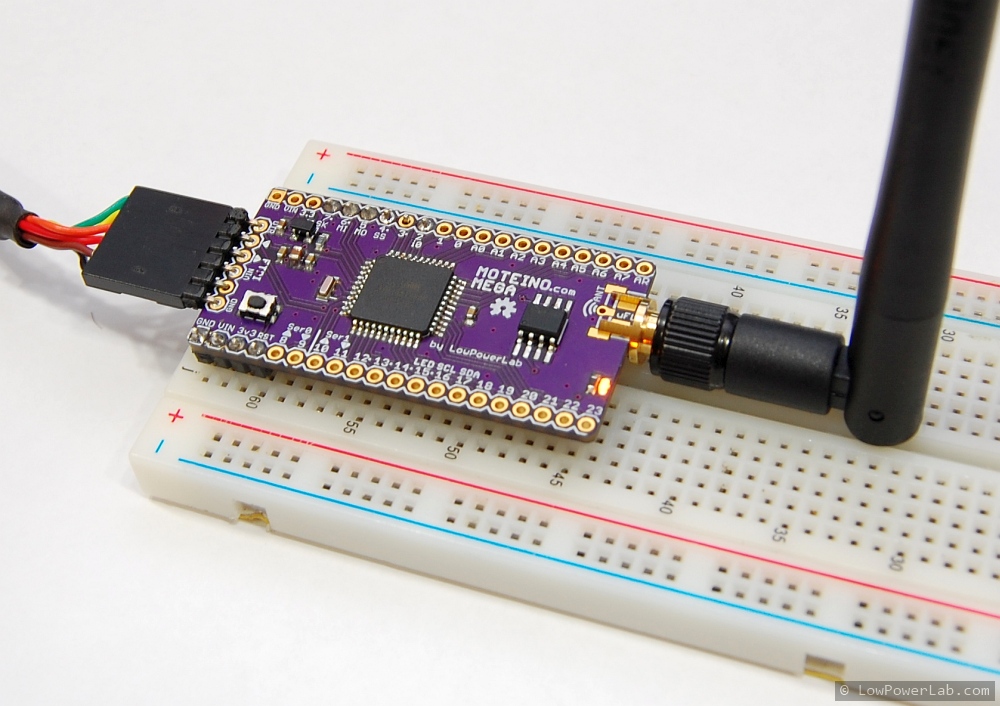
Following the MoteinoMEGA release, the RFM69 library and examples have been updated to support MoteinoMEGA, there are significant changes to the library and you should get latest. The MoteinoMEGA Arduino Core has been released and needs to be installed in the Arduino/hardware folder (stable v1.0.5 tested working) before uploading to MoteinoMega. The Eagle source and schematic/board files are published in the LowPowerLab github repository. The Moteino page was updated to reflect the addition of the MEGA to the Moteino family.

The Wireless Programming library and examples are updated to fix bugs and support the MEGA as well. Another important change is the introduction of radio.ACKRequested() function in the RFM69 lib which should be used instead of the radio.ACK_REQUESTED variable. This ensures that ACKs requested by a broadcaster are ignored and only targeted ACKs are responded to. Please update your examples for proper wireless programming behavior. All examples have been updated to reflect this change. Also the SwitchMote sketch has been updated.

I consider this a major release and hence your constructive feedback and notification about anything that was omitted is appreciated.

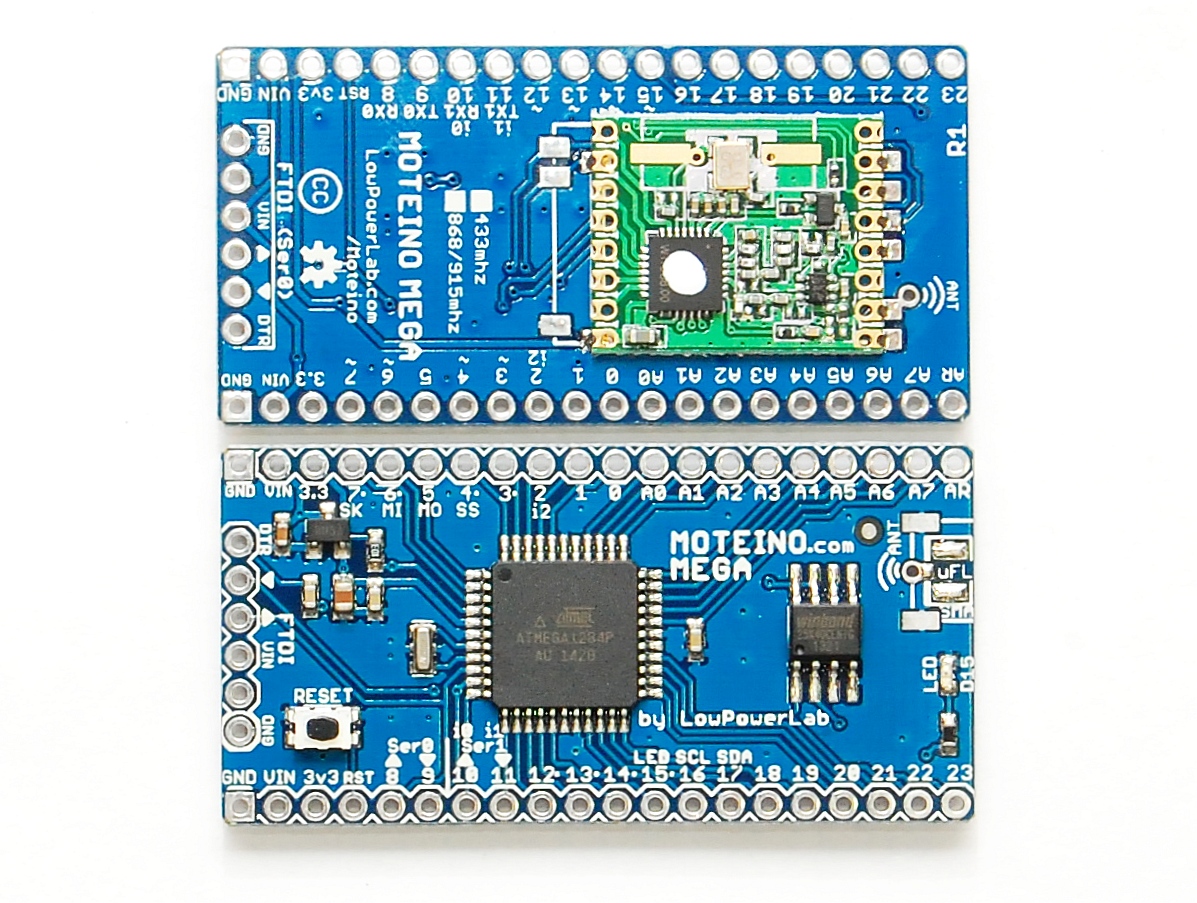
MoteinoMEGA available now!


UPDATE: Library/Eagle files/MEGA Arduino Core/Example update notes are here.


It’s alive and it’s BLUE!

After long PCB manufacturing delays and a lot of headaches, the PCBs finally arrived, and I assembled the first batch of MoteinoMEGAs today and they are available in the shop.

Other news:

  • MoteinoUSB is also back in stock now.
  • Worth noting that all Moteinos have started to ship with MCP1703 regulator which allows up to 16V input.
  • MightyBoost is being worked on and should become available in a few days if all is well.
  • There is a major release of patches coming to the RFM69 library, wireless programming library, SPIFlash library, along with the new MoteinoMEGA arduino core that will be released soon.
  • DualOptiboot is will also be upgraded to V5 and is compatible with Moteino, MoteinoUSB and MoteinoMEGA. All these boards are wirelessly programmable via DualOptiboot and the FLASH chip. The MEGA board will have a limit of 64kb wireless image upload even though the total flash available is 127/128KB (DualOptiboot takes 1K).

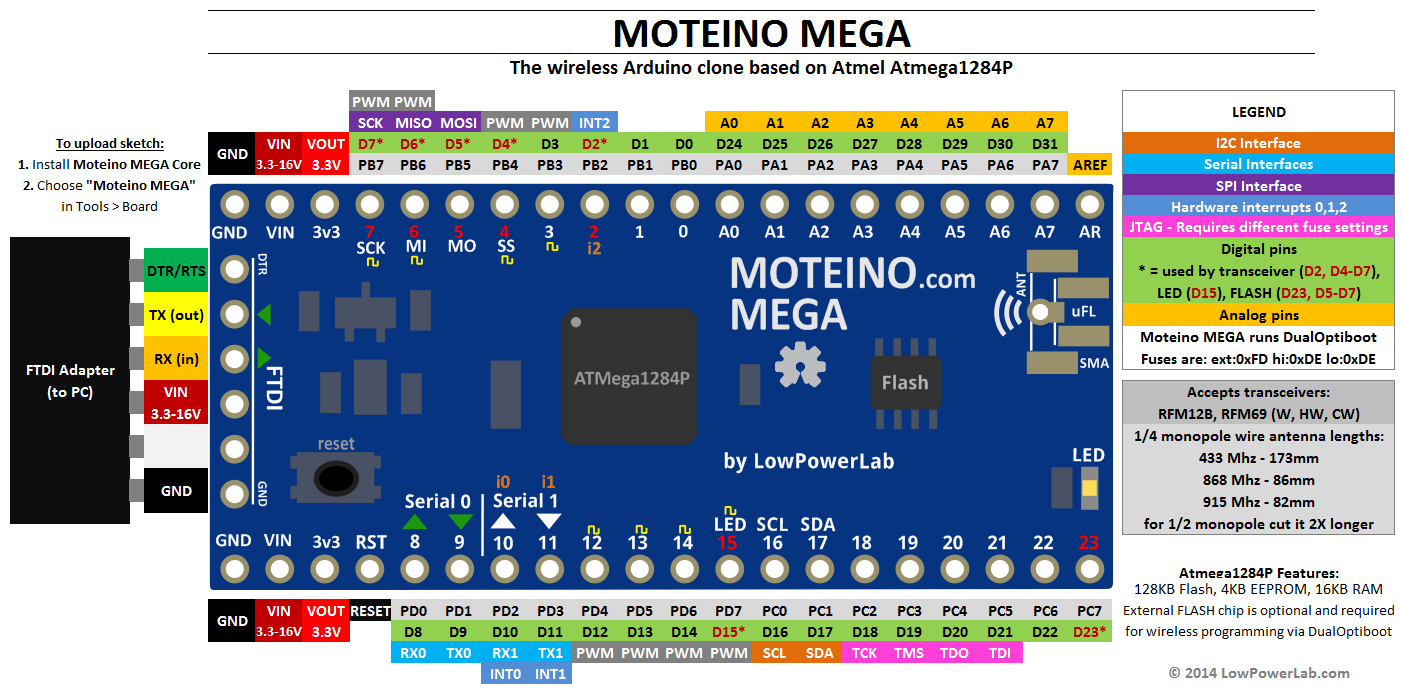
Documentation and product pages are being worked on, so stay tuned for all these releases. Here is the pinout diagram for MoteinoMEGA:

Lasercut strip feeder for your pick & place

Got pick & place? Cool.
Got cut strips components but no strip feeders? No? Then this post is for you.

Problem: You need to assemble a small run of boards in your pick and place and buying full reels of parts makes no sense, instead you get a low count in cut strips. Strip feeders cost a lot, and they are not very special, just cold dumb metal. Of course, the manufacturer will sell you high quality feeders machined from aluminum/steel, but placing components from cut strips that already have pockets spaced evenly sounds like a very easy problem right? I mean you could just stick them on a cardboard with double sided tape and then teach the machine the first+last and it figures out the rest. That works but it’s a pain when you need to reload – you have to re-teach the machine since you won’t stick it exactly in the same place, you’re almost better off placing by hand.

Solution: So let’s make a strip feeder. I have lots of components that are less than a full reel (exotic resistors, transistors, crystals, caps, mosfets etc). Most of these are 8mm and 12mm tape, rarely 16mm. So it would be perfect to have a strip feeder that can be placed in a fixed position in the machine. To reload you just cut the pre-determined length, feed it through and align the first pocket to a marker on the side, reset component count for that row, and machine already knows where to continue, quick and easy. Continue reading →

MightyBoost!

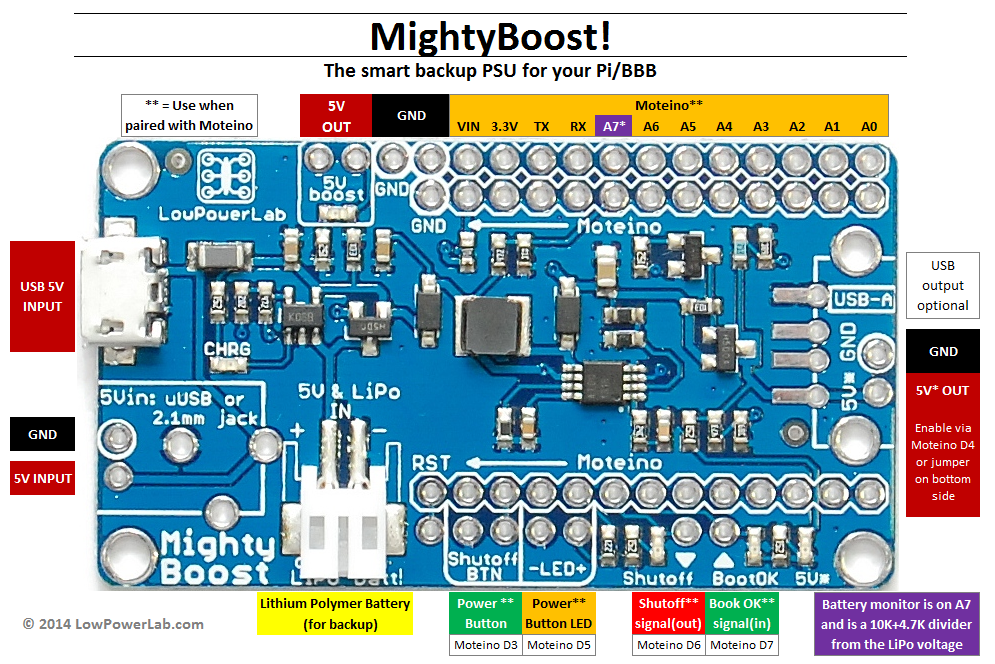
For some time I wanted a solution to power outages that can happen without warning for various reasons (do you ever find your alarm clock blinking?). My RaspberryPi runs on power supplied through ATXRaspi but when mains power goes out, the Pi will be cutoff without a proper shutdown, which can damage the OS image and if you’re away and depend on the Pi for home automation or other critical functions and the SD gets corrupted from a sudden power loss, it can be an issue. Adding to that thought, at least several people wanted a way to be able to install Pi’s in their cars or in some unusual project where external power is cutoff as soon as ignition is turned off, but they wanted the Pi to then self-shutdown or allow it to have that extra time it needs. So I started thinking of a PSU board that will have the features of ATXRaspi but also integrate a LiPo battery and act as a backup PSU in case of outages. So I came up with this: MightyBoost, a new project that is providing a pack of features:

  • 5A-2A boost supply
  • LiPoly charger (default 200mA, 500mA via jumper, see explanation below)
  • Provide power from input as long as it’s present and charge LiPoly
  • Act as backup supply when power is cutoff and switch to LiPoly source
  • Moteino controlled mode (default) where Moteino will provide the smart features of a shutdown button and signalling to your Pi, BBB, etc. Moteino also senses when power is switched to backup and can sense battery level and make decisions when to signal Pi to shutdown cleanly (ie immediately or when battery finally runs out, etc.). That means you can control it in any way you want based on a number of inputs and conditions. Sample code will follow the release.
  • Standalone mode (via jumper) where it can be used as LiPoly to 5V boost supply. This allows you to power anything requiring 5V including for instance your internet modem or router or other things like that which you’d want to stay alive during an outage
  • Provides a boost for your Andtroid/iPhone/iPad when in need
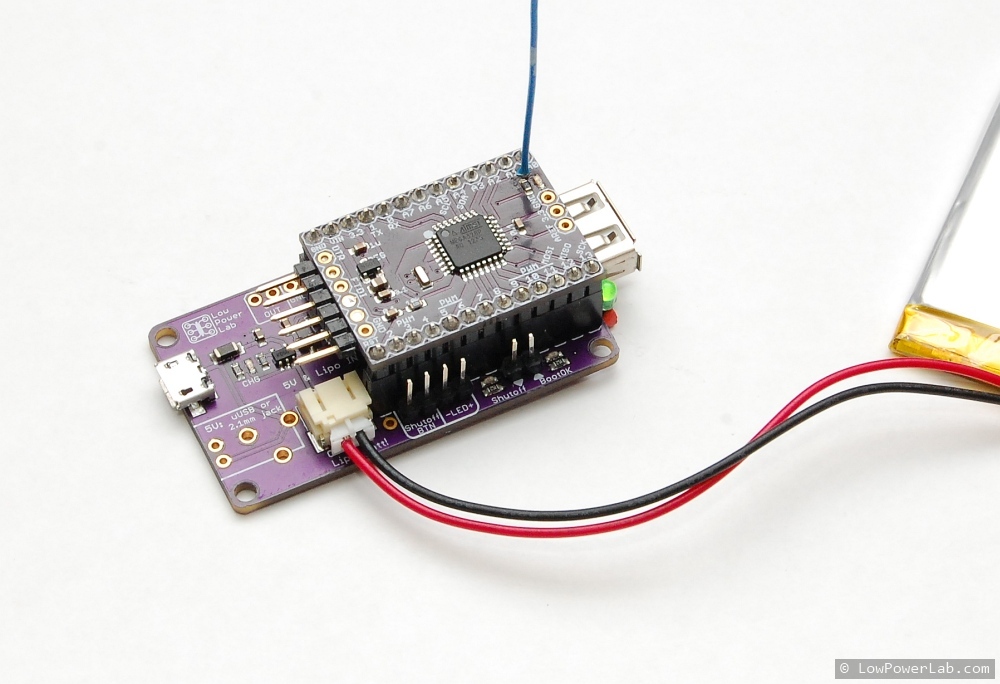
  • When coupled with Moteino, it could act as a compact smart backup PSU + Moteino gateway for your home automation, when a RFM69/RFM12B transceiver is added.

Continue reading →

Pick and place – commercial options

HDR_2This post is a follow up to the “pick and place” category of articles, if I can call it that, I am trying to keep my promise of discussing some commercial pick and place machines. I researched for a good entry level (non DIY/kit) pick and place machine that could cover assembly needs without a lot of baby sitting. I am not talking about high end machines here, but something like what Adafruit or Sparkfun first got into, something suitable for a startup both feature/budget-wise. Even these entry level commercial machines are easily in the tens of thousands of $. You can easily spend twice what you’d pay for a brand new reliable car. I don’t know about you but when I think of spending that kind of cash I’d want to do my homework and know everything I can possibly expect from the product. This article is not meant to be exhaustive but I hope to cover most concerns and give a good idea what is important to look for, I can only wish there was a concentrated resource like this when I first started my research. It’s a long writeup but I hope those interested in the subject will appreciate the aggregation.

First let’s look at some of the things I learned along the way, and the features you may run into or want to consider. Then we’ll look at some of the available machines and discuss pros and cons. Continue reading →

Moteino MEGA update

I wanted to give those interested an updated about my efforts with Moteino MEGA (atmega1284p based Moteino). The issues are now apparently resolved and the atmega1284P is playing nicely with the RFM69 radios and the Windbond FLASH chips I am using and I am looking forward to making the first batch of MEGAs in the near future. It was mainly a SPI timing issue and the 1284P core. I was also able to rewrite DualOptiboot based on Optiboot V5.0, and can confirm that wireless programming is working on the 1284P, I will post the updated bootloader soon. There will be minor but important updates to the RFM69 and SPIFlash libraries. I will release all these in the near future along with the MEGA and its own Moteino MEGA Arduino core. Hopefully this will be a useful and stable platform for those in need of more GPIO and the extra features of the  larger atmega1284p microcontroller.