Temperature and RC-Calibration for RFM69

I added two new functions to the RFM69 library: readTemperature() and rcCalibration(). Thanks to John for contributing.

  • readTemperature() function reads the internal CMOS 8bit temperature value, it’s fairly useful for situations where temperature varies a lot and RC calibration would be needed.
    The Gateway example has been updated to reflect its usage.
  • rcCalibration() will trigger a calibration of the internal RC oscillator. This is automatically performed at power-up according to the Semtech SX1231 datasheet section 4.3.5. But it can be triggered with this new function, as John has mentioned in the forum that when temperature changes, the RC oscillator will be affected, and a dramatic temperature shift will result in a frequency shift as well, causing a link to possibly be broken (for instance when your receiver is inside your house at room temperature and the transmitter is outside in bitter cold winter).

With the combination of these two functions, you can now recalibrate the RC based on temperature change, and also report a rough ballpark of what the temperature is. If you need more accuracy, a separate temperature sensor like the DS18B20 should be used.


Mailbox notifier project upgrade

Time for an upgrade to my mailbox notifier. I long wanted to give it an upgrade and folks kept asking. Here are the things I wanted to change/add:

  • the transistor was a rather unnecessary complication and it made assembly more difficult. The hall sensor could simply be powered from a Moteino pin
  • a more weather proof enclosure would be nice
  • use more velcro to keep the thing from falling off (happened a few times when the mailman was more violent with my mailbox door).
  • how about battery voltage reading too!
  • upgrade code to use structs since all I’m sending is a bunch of integers
  • I wanted a standalone receiving unit with a LCD screen which I could operate from another 9V battery or just plug into an FTDI for quick reading. The other receiver on the RaspberryPi could still receive the same packets and still send an SMS

Clipboard01

Continue reading →

Update & RFM69 lib bug fixes

For those wondering what’s going on with the silence, I have been quite busy but I am continuing to work on improving Moteino and the libraries behind it. I hope to release news on what I’m up to in a few weeks.

The forums are now picking up activity and they are a good place to check out for various support questions that have already been answered and also to see what others are saying/sharing about Moteino.

I encourage you to keep an eye on the library source code on github for bug fixes. I am working to extend the RFM69 library and occasionally I find code that I can improve and even bug fixes. For instance right now I patched a fix for the setPowerLevel(byte level) function which was declared incorrectly as protected and also had a bug. This bug fix is especially important for those that have Moteinos with RFM69HW radios. Overall my feeling as I develop with the RFM69 library is that it’s becoming a more and more stable piece of code. I do rely partially on others to provide feedback and I appreciate those who can participate and submit suggestions.

RFM69HW transceiver now available

Finally it’s here, the high power version of the RFM69W FSK transceiver is now available in the store!

This is a relatively new transceiver from HopeRF, suggested replacement for RFM12B, RFM22B going forward. Some rumors have gone around that those transceivers might be phased out, but HopeRF has told me there are no such plans, however they do “recommend the RFM69 in place of RFM12B/RFM22B for new designs”.

Based on my range tests, and on some feedback, these might be an ideal RF platform for RC controlled drones, even the RFM69W should give you a pretty long range, especially in open air.

RFM69HW

The RFM69HW is a 20dBm output power transceiver. In my open-air range tests I ran out of space at around 370m with this one. So potentially these will go significantly farther. The tests were done with my Gateway/Node example sketches, at 55.5kbps air bitrate, 50khz frequency deviation. If someone has better results with other settings please let me know.

They are powerful but will need more current to work, 130mA in transmit mode (for a short few milliseconds while the packet is modulated/transmitted), and the same 16mA in receive mode. So far the Moteinos in their current configuration seem to handle the high current spikes just fine.

HopeRF has suggested that 868Mhz units can be replaced with 915Mhz units that are loaded with 868Mhz settings. I have verified this myself with range tests and I don’t see any significant difference when using 915Mhz units at 868Mhz. Hence if you need 868Mhz units please get 915Mhz units and initialize them with settings for 868Mhz.

Wireless programming Moteino R3

It works!

The last few weeks I have spent a lot of time tweaking the RFM69 library and trying to get the wireless programming to work. I believe the RFM69 library is now more stable and ready for some prime time and also the wireless programming is working nicely for Moteino R3. If you think about it, being able to reprogram a mote that is 200m away, or somewhere in a tree, underground, in your attic, or on the bottom of your pool, is a pretty cool thing.

I reorganized the Github repository a little, moved some files and now the classes for wireless programming are in their own repository to avoid conflicts with the SPIFlash lib:

https://github.com/LowPowerLab/WirelessProgramming

If you have a Moteino R3 (or R2) with the onboard FLASH chip, you are ready to try programming it wirelessly, go ahead, it’s pretty neat.

The examples for Moteino R2 and R3 are in the directories for their libraries: RFM12B and RFM69.

More great stuff is coming, I got a lot of ideas for Moteino R3, I am thinking of migrating my home wireless sensor network to R3 and implementing a lot more home automation on these.

RFM69 library and Moteino R3

This is the library that I’ve been working on for the new RFM69 modules from HopeRF. I consider this an initial beta release and it surely is a work in progress, it may contain bugs, but the provided Gateway and Node examples should work out of the box and illustrate basic usage. Please let me know if you find issues. The syntax is a little similar to that of the RFM12B library, but I went with some new conventions on naming and overall structure to improve readability and overall code quality.

This is a video introduction to Moteino R3:

This is a new product and the library needs more testing and performance tuning. The library currently is tuned for fixed 433/868/915 Mhz frequencies, and a 50khz bitrate, 50khz frequency deviation. I am hoping others will contribute and test the library to find the best combination of these settings and power level vs range vs frequency vs bitrate, etc.

Continue reading →

MoteinoLeo: new LowPowerLab family member

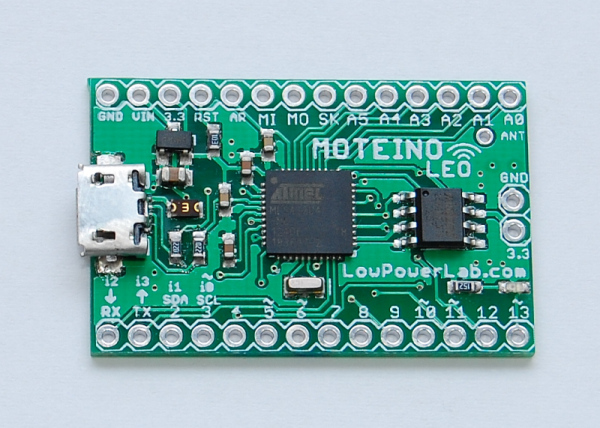
MoteinoLeo_R1_withFlash

Update: MoteinoLeo is now discontinued and no longer available for sale.


The difference between MoteinoLeo and the regular Moteino is pretty obvious – it’s got built in USB. It’s conceptually an Arduino Leonardo clone, with an RFM12B transceiver solderable on the bottom, with a few minor changes and some added features. It runs at 16Mhz, 3.3v, has an optional FLASH footprint for data logging (wireless programming on Leo is not yet achieved, perhaps in the future if a custom bootloader will permit). There’s also a 750mA PTC fuse to protect the USB against shorts or over current.

Design files are on the MoteinoLeo Github repository.

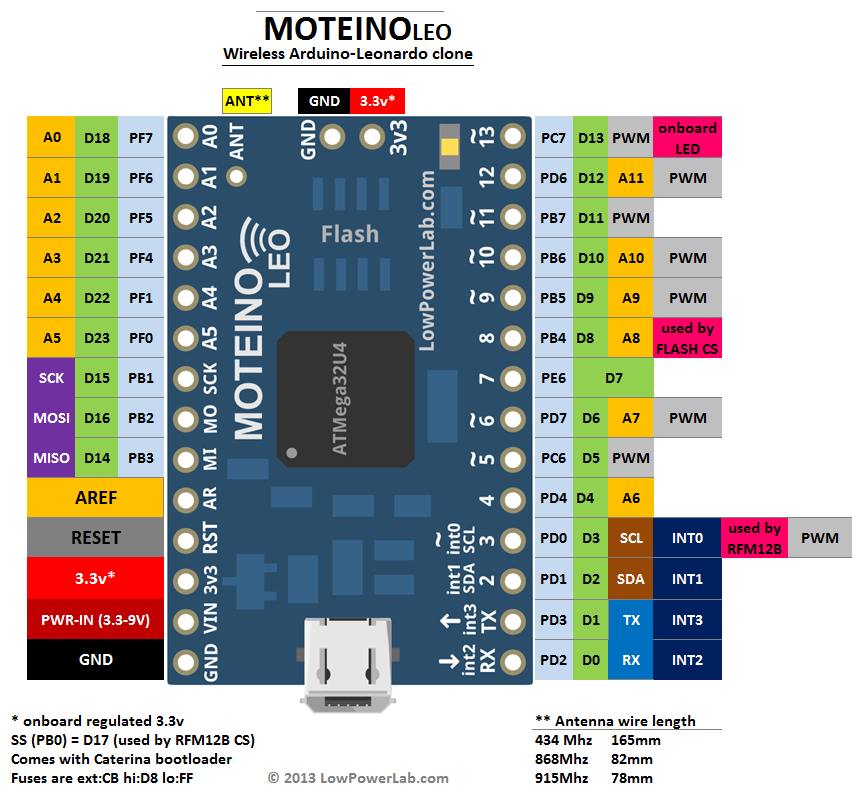
Here’s a pinout diagram:

MoteinoLeo_PINOUT

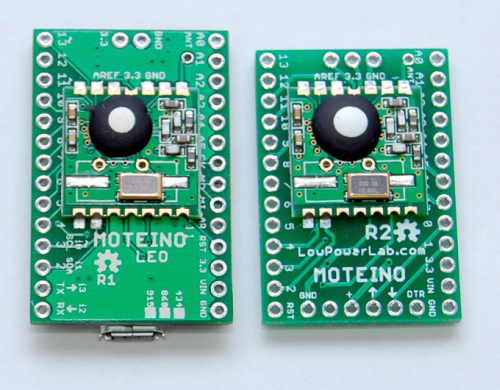
Compared to Moteino:

MoteinoLeo_top_comparedMoteinoLeo_bottom_compared_small

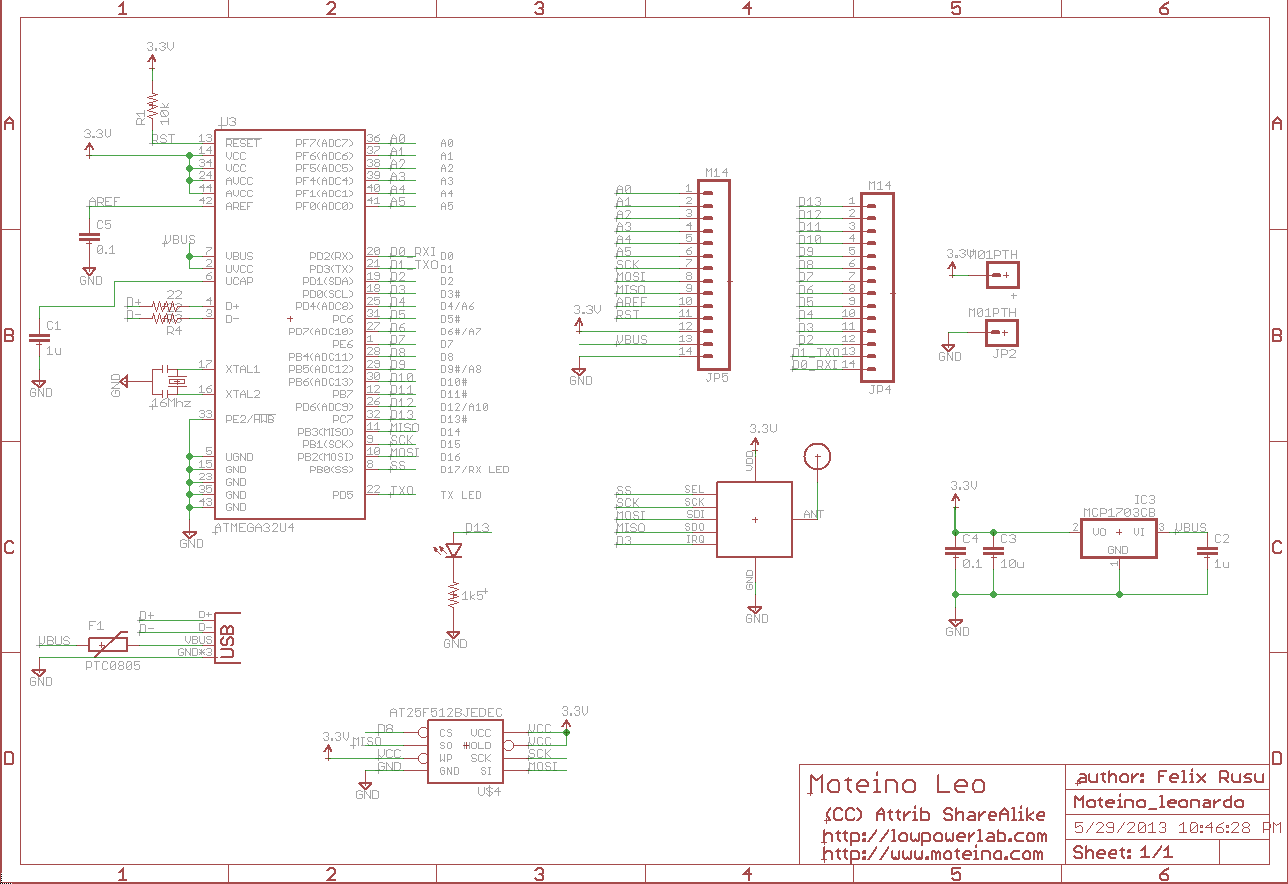
Schematic:

schematic_R1

Wireless programming update

The initial code commit for wireless programming was a little sluggish and the performance wasn’t very good. I had to add delays to make sure everything was synch-ed and the protocol was working. The result was a rather slow wireless upload of a new sketch, especially if it was a large sketch. But it worked…

Today I worked on improving the protocol and was able to cut down the over-the-air upload time by a factor of ~5. The gains are mostly from improved serial communication. This will still take about twice as long as normal sketch uploads by means of an FTDI adapter. For instance, a 9,8Kbyte sketch takes me about 11 seconds to upload directly to a Moteino using an FTDI cable; wirelessly programming that same sketch takes about 22 seconds. Not bad given how involved the whole handshaking protocol works. And much better than almost 1 minute with the old code. So I’m classifying this new release as a beta. More improvements or bug fixes might be added later, but it’s definitely a functional release. I’ve uploaded different sketches of around 10KB several times without a glitch.

The wireless sketches examples (gateway and node) and the python script are in their github repo. The SPIFlash library was also updated (the WirelessHEX part of it), so get latest before you try this.

As mentioned before, the target node of the wireless programming protocol will need to have an SPI Flash chip attached (if they don’t have one already), and also run the DualOptiboot bootloader for this to work. Moteinos come with this bootloader (all orders since the other Wireless Programming post and code was released). If you have all these components right, any Arduino clone with an RFM12B transceiver and an SPI Flash chip of at least 32Kbytes of memory will do the job.

Just for fun, here’s how the end of a wireless upload looks like, notice there were 617 packets sent all the way from the PC (through the python script) to the attached Moteino (gateway), wirelessly to the remote Moteino (target node):

Transmission_end

Sump pump alert with Moteino & HC-SR04

UPDATE: This project has been replaced/updated with SonarMote. See this blog post for a more rencent implementation of what you see here. The alerts are now implemented as simple events on the Moteino Gateway.

Here’s another project I wanted to do for a long time. I wanted a sump pump flood warning alert system in place, for peace of mind when I’m gone from home for prolonged periods. For whatever reason I thought this was going to be more difficult but no, it’s almost as easy as pie!

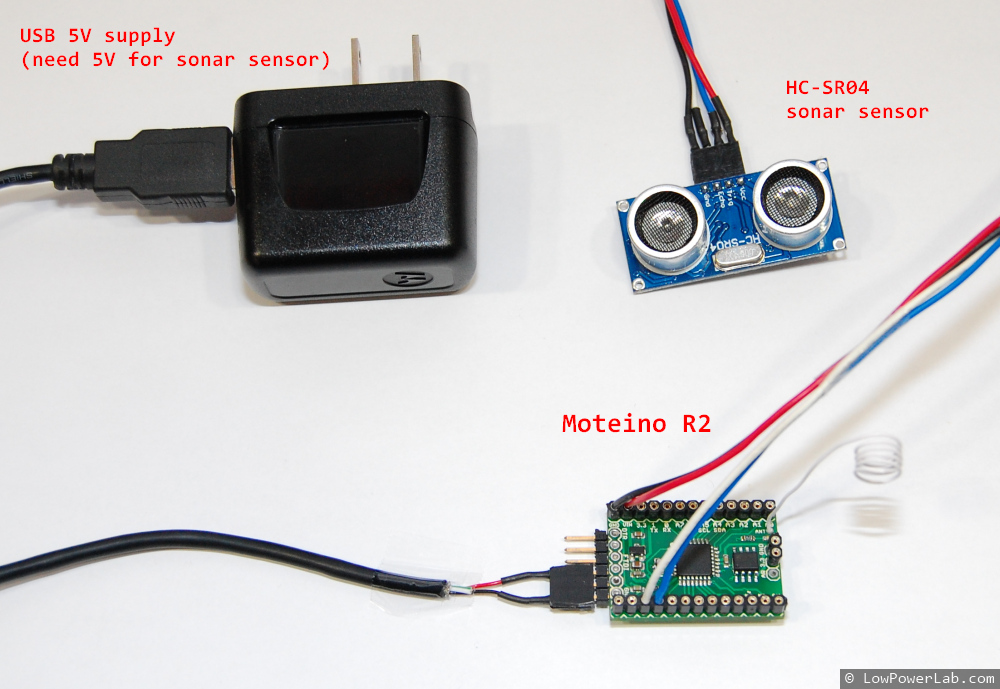
All I needed was a HC-SR04 sonar sensor and a USB 5V wall supply. The sensor only works at 5V so this method of powering the Moteino was very convenient since I already have an outlet close by for the sump pump.

The sensor has 4 pins clearly marked: VCC, GND, TRIG and ECHO. I connected VCC to VIN on Moteino, ECHO goes to D3 and TRIG to D4.

Moteino_HC-SR04_SumpPumpAlert

I used some of the code this instructable to get started and added my wireless code to handle packets and blink the LED and was done in no time. The setup was very simple, I estimated a good spot underneath the sump pump cover where there are no obstructions inside, cleaned it up, taped some velcro, secured the wires and that was pretty much it.

 Moteino_HC-SR04_SumpPumpAlert_cover Moteino_HC-SR04_SumpPumpAlert_installed

I added a few lines of code to my main Python script running on the RaspberryPi.
By the way, here’s how my RaspberryPi setup looks like, including the ATXRaspi power controller, the power button and the gateway Moteino (it’s an older R1 but just as good for as a gateway):

Moteino_RaspberryPi_ATXRaspi_PowerButton

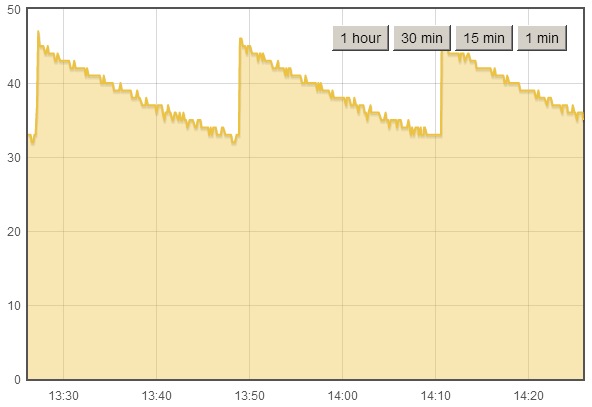
The Python script logs the data to EmonCMS and here’s a graph of how that looks like, the Moteino reports the distance to the water surface, so the spikes means the sump pump just kicked ON, and as water rises the distance decreases until the pump starts again:
EmonCMS_SumpPump

It’s been a rainy spring so far here and I knew my pump kicks ON quite often, now I can see it in real time, and setup alerts if the water rises too much. Seems like the pump is always pumping water out when it rises to 32cm below basement surface. So setting an alert to something like 20cm below surface should be enough since I don’t expect the water to ever rise so much as long as the pump works. The alert code will send me a SMS message when this happens, here’s a test level, I set the live value at 20cm:

Moteino_HC-SR04_SumpPumpAlert_SMS

You can of course setup other types of alerts – like audio alerts or maybe a LED visual indicator (less useful when you’re not in your basement).

Fun/Scary fact: The sensor is very accurate even though there’s a variance of 1cm between some readings (resulting in a sawtooth graph) as water rises. Based on the graphs, how often the water is pumped (every ~23 minutes), and how big the reservoir is, I figured my sump pump removes roughly about 18.5 liters every cycle, or about 1158 liters (306 gal) every day, wow!

So now there’s an extra level of peace of mind when I leave on vacation. I guess being gone for even 1 day could mean disaster if the sump pump breaks down at the same time!

Time to think about how to gather/store all that water instead of throwing it away, after all, I pay something like $11 for every 1000 gallons of city water.

Source code is on GitHub: https://github.com/LowPowerLab/SumpPumpAlert